VS Code extension
The Viewi Components extension adds Viewi support to VS Code: highlighting and autocomplete in .html templates, and Go to Definition from a template to the PHP behind it.
Installation
Open the Extensions view (Ctrl+Shift+X), search for Viewi Components and click Install. Or from the command line:
code --install-extension viewi.viewi-componentsIt needs VS Code 1.80 or newer.
Open your project folder. The extension looks for components when the project opens. To check that it works, open any component's .html file and type <: your components are in the list, marked Viewi Component.
How it works
The extension pairs Name.php with Name.html in the same folder, the same way Viewi does. From the PHP class it reads:
- public properties, with their types,
- public methods, with their parameters and return types,
- the parent class and the traits, so inherited members are suggested too,
- methods marked
#[GlobalEntry], which every template can call.
Private and protected members are left out, and so are the lifecycle methods: __construct, init, mounting, mounted, rendered and destroy.
Suggestions appear when you type <, {, $ or a space inside a tag. Ctrl+Space shows them anywhere in a template.
Features
Autocomplete
Component tags. After < you get every component in the project, including the ones from packages such as Viewi UI, plus slot, slotContent and template.
Props. Inside a component's tag, <Accordion, you get that component's public properties with their types. You don't have to open the component to remember what it takes.
Properties and methods. In text, in attribute values and inside { } or {{ }}, you get the current component's properties and methods, including inherited ones and global methods like t():
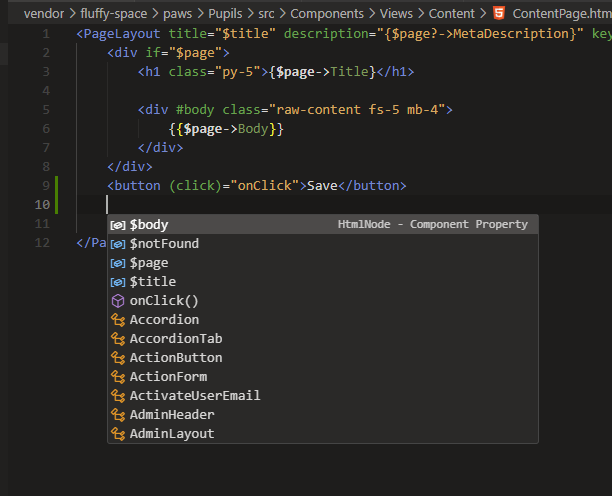
Event handlers. Inside (click)="" you get the component's methods, each in two forms: onClick and onClick($event).
Go to Definition
F12, or Ctrl+click, jumps from the template to the PHP:
- on a component tag, to that component's class,
- on a prop of a component tag, to that property in the component's class,
- on a global method such as
t(), to the method marked#[GlobalEntry].
It works across packages. A prop of a Viewi UI component opens the property in vendor/viewi/ui.
Settings
viewi.enableAutocompletion- turns the suggestions on or off. Default:true.viewi.componentSearchPaths- folders to look for components in, relative to the project folder. Default:["."].
By default the extension reads the whole project, vendor included. That is how components from packages show up. In a big project you can list only the folders that hold components:
{
    "viewi.componentSearchPaths": ["viewi-app", "vendor/viewi"]
}
Known limits
- The PHP classes are read with regular expressions, not a full PHP parser. Unusual formatting can hide a property or a method.
- Event names and modifiers are not in the suggestions yet: you type
clickorkeyup.enteryourself. Inside the brackets and in the handler you get the component's methods. - If the suggestions look out of date, reload the window (
Developer: Reload Window).
The source is on GitHub. Bug reports and ideas are welcome there.